The Wiimote and the PC: A second phase The Wiimote communicates with the Wii via a Bluetooth wireless link. The Bluetooth controller chip is a Broadcom 2042, which is designed for use with HID devices (human interaction
machine).
The Wiimote does not appear by default in Bluetooth devices. It must synchronize
or by pressing A + B + 1 + 2, or by pressing the red button in sync
the location where the batteries. Once in this mode, the Wiimote can be detected by the Wii (or PC) and sync. During the 4 LED mode sync the wiimote clignotent.La Wiimote can alorscommuniquer with Wii (or PC).
The interface between the 2 is composed of 14 inputs and 10 outputs.
Outputs:
0x11: LED wiimote
0x12: Control of motion sensors
0x13: 0x14
Vibration: Vibration
0x15: 0x16
Vibration: Unknown
0x17: Unknown
0x18: 0x19 Unknown : 0x1A
vibration: Vibration
Entries:
0x20: Port Expansion (Nunchuk, Classic Controller)
0x21: 0x22
Not used: Not used 0x30
: Buttons (A, B, 1.2, Home, -, +)
0x31: motion detection
0x32: Not used
0x33: motion detection
0x34: 0x35 Not used: motion detection
0x36: 0x37
Not used: motion detection
0x3D: Not used
0x3E: 0x3F motion detection: motion detection
outputs correspond to data packets sent from the Wii (or PC) to the Wiimote
entries correspond to data packets sent from the Wiimote to the Wii (or PC).
In the data field of a packet, we then find information like:
"A1 30 00 00" A1
means we observed an incoming packet (it would be 52 for an outbound packet), on entry No. 30 (30), with the following 4 bytes of data that correspond to the button state. <-> Buttons:
data "A1 30 00 08", mean that the button is active.
A packet with the data "A1 30 00 00" is sent when no key is pressed.
If button 1 and 2 are active, there will be a packet with the data "A1 30 00 03" (0x0001 + 0x0002).
following hexadecimal values for each button:
1: 0x0001 2:
0x0002 A: 0x0004
B: 0x0008
-: 0x0010
Home: 0x0080
Left Arrow: Arrow Right
0x0100: 0x0200
Arrow: Down Arrow
0x0400: 0x0800
+: 0x1000
Movement:
By default, the Wiimote does not send information motion detection.
To enable sending a packet should be sent to the exit 12 of this type "51 12 00 31"
the last byte (31), allows to specify which entry, send the Wiimote should flow information corresponding (31,33,35,37,3 E or 3F). Once the wiimote
receives this packet (51 12 00 31), it will send real-time les
informations des capteurs sur l'entrée 31.
Pour arrêter le streaming, il suffit d'envoyer un paquet avec ces données "51 12 02 30".
On aura des paquets de données de ce type en streaming :
"a1 31 40 00 86 8a a5"
Si on aurait utilisé l'entrée 33, on aurait eu :
"a1 33 40 00 86 8a a5 ff ff ff ff ff ff ff ff ff ff ff ff ff"
tout les FF étant des bits de bourrage, car les informations des capteurs de mouvements n'ont besoins que de 5 octets.
L'entrée 31 permet de transférer 5 octets à la fois, l'entrée 33 => 17 octets, l'entrée 35,37,3E et 3F => 19 octets.
In the packet data "a1 31 40 00 86 8a a5", 86 and 8A A5 are the states of 3-axis of the wiimote (see drawing).
3rd byte of data (86) => X Axis
4th byte of data (8A) => Y Axis
5th byte of data (A5) => Z axis The detector uses a coordinate system with axis positive abscissa to the left, and the Z axis positive upward. The forces on each axis are digitized in unsigned 8-bit, zero corresponds to 0x80.
We are 256 possible states per axis ranging from -128 to 128.
Outputs:
4 LED des joueurs :
La wiimote contient 4 LED qui indique le numéro du joueur correspondant à la Wiimote.
Comme vu ci-dessus, on utilise la sortie n°11, chaque paquet contient 1 octet de données.
Exemple : "52 11 10" ce paquet permet d'allumer la LED n°1.
LED 1 => 10 (10000 en binaire)
LED 2 => 08 (01000 en binaire)
LED 3 => 04 (00100 en binaire)
LED 4 => 02 (00010 en binaire)
Pour allumer les 4 LED, il faut mettre 1E (11110 en binaire). Le retour de force (vibreur) :
Les informations d'activation/désactivation du vibreur circulating on the output choice
13,14,15,19 1A or by sending a packet of this type:
"52 13 01" (01 to activate the vibrator)
"52 13 00 (00 to disable the vibro )
This text is a translation of the documentation available here: Live CD Wii
A driver is in development for Linux, a driver should also be created quickly to Windows now that the protocol exchanges between the Wiimote and Wii is decrypted.

 - Control of the Mouse, Joystick
  - Sensitivity adjustment
  - Calibration ...
 Lot 1: Power on 9V
  or 2.90 € 1.50 €
  Resistance about 100 Ohms:
  Then go to Menu PPJoy GlovePIE.
  burn your TV / PC


 http://wiipiicii.free.fr/WiinSaber_v0.8.2.rar


 Wiimote.Led4 = true = false
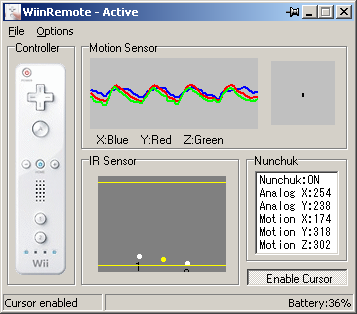
 Google Earth
 12-3.5-1.5-1.5-3.5 = = 2V

 Buttons
  A, B,
A, B, 
 Wiimote.Leds


 To illustrate this, a player has disconnected the sensor bar for Wii, and replaced by two infrared LEDs (ie, 2 TV remotes operating).


